 learn
learnCounting Symbols Automatically (Autocount)
Quick path
- Add Count
- Autocount by symbol
- Accept
- Find text or symbol to count
- by Symbol
- Accept
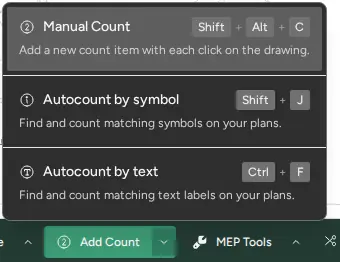
Autocount finds every copy of a symbol on a drawing from one example you box. Not every account has autocount turned on. If Autocount by symbol is not in the count menu, it isn't enabled for you; use Manual Count instead.
Count a symbol on one drawing
- On the bottom toolbar, open Add Count and choose Autocount by symbol (shortcut Shift+J).
- The banner reads "Draw a rectangle around the symbol you want to count". Drag a tight box around one example of the symbol.
- Boon searches the page and shows how many it found.
- When the banner reads "Accept or redraw rectangle", click Accept to save the counts, or Redraw to box a better example.
Accepted counts are saved in a group named "Autocount". Rename or reassign it like any other group.
Fix the results before accepting
- Click a found marker to remove it; click it again to bring it back.
- Shift + click on the drawing to add a marker Boon missed.
- Move the Sensitivity slider toward Less or More to find fewer or more matches. Detection re-runs when you change it.
- Use Add text to keep only symbols with matching text next to them (for
example a tag like W2).
*matches anything.
Count by text
Choose Autocount by text from Add Count to count every place a piece of text appears on the drawing, such as a fixture tag.
Search to Count (find bar)
Some accounts have the newer find bar instead of the banner:
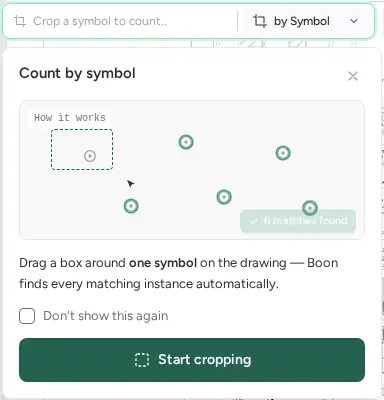
- Click the find bar ("Find text or symbol to count") and pick by Symbol or by Text.
- For text, type the text and click Search to Count. For a symbol, box an example on the drawing.
- Review the result, then click Accept. Use Redraw (symbol) or Search again (text) to retry.
- To count across more sheets, under Search other drawings click Select drawings and pick the sheets in Select drawings to search.
A page must finish processing before Search to Count can run on it.
When detection fails
If the banner shows that detection or saving failed, click Redraw and box the symbol again. A tighter box around a clean, unobstructed example usually works best.