learn
learnDeleting Extracted Schedules and Legends
Quick path
- Schedules & Legends
- Tables
- Delete
- Schedules
- Delete
- Delete extraction?
In the original takeoff experience, schedule tables Boon extracted from the drawings are listed in the Schedules & Legends panel. The newer takeoff lists them in its Schedules panel instead (see the last section).
Delete one schedule table
- Open the Schedules & Legends panel and the Tables tab. Tab labels show counts, for example "Tables (4)". Legends work the same way on the Legends tab.
- Open the three-dot menu on the table's row and choose Delete.
- A toast confirms "Table deleted successfully".
Delete several at once
- Tick the tables to remove. Select All and Deselect All are above the list, and a counter shows how many are selected.
- Click Delete (next to Perform Takeoff and Export).
- A toast confirms how many schedule tables were deleted.
Before you delete
In the original takeoff there is no confirmation prompt: the delete happens as soon as you click. Double-check the selection, especially for a bulk delete.
Delete schedules in the newer takeoff
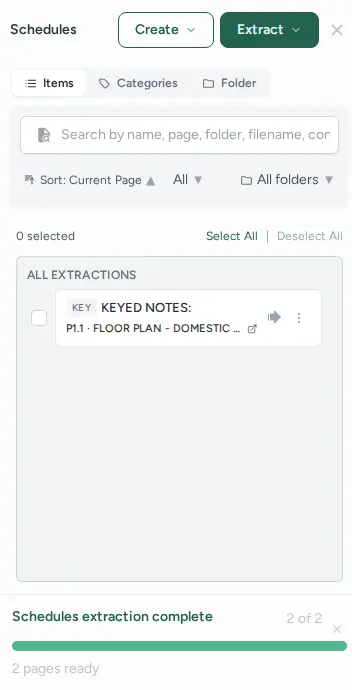
- Open the Schedules panel. Extracted schedules are listed there with other extractions such as legends and notes.
- Open the three-dot menu on a row and choose Delete, or tick several rows and use Delete in the bulk toolbar.
- Confirm in the "Delete extraction?" dialog. This cannot be undone.