 learn
learnWhy an Item Is Missing From the Estimate
Quick path
- Takeoff Sync
If a measurement or item you expect (for example a cleaning or finishing item) isn't in the estimate, check these causes in order. Boon has no rule that drops specific items by name, and it does not hide zero-quantity lines.
The item was never attached in takeoff
Takeoff sync only creates estimate lines for catalog items attached to a takeoff measurement or group. If the item isn't attached there, sync won't add it.
Fix: attach the item to the takeoff group, or add it in the estimate by right-clicking the takeoff row and choosing Add child item.
Takeoff Sync is off for this version
Only estimate versions with Takeoff Sync turned on receive takeoff measurements. Turning it on shows "This will sync all takeoff annotations to line items in this version."

The sheet is archived
When archived-sheet exclusion is turned on for your account, measurements on archived sheets stop contributing to the estimate on the next sync. Recover the sheet and sync again to bring them back.
A filter or saved view is hiding it
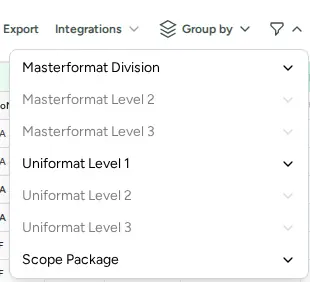
Check the estimate filter control ("Toggle filter options": MasterFormat, UniFormat, Scope Package), tag filters, any drawing or system scope banner, and the saved view you're on. Clear them and look again.
It was replaced by an alternate
Rows replaced by an alternate, or that belong to an alternate that's turned off, are hidden from the grid.
The measurement was deleted
Deleted measurements are removed from the estimate on the next sync.