learn
learnSeeing Item Cost, Unit Price and Where Prices Come From
Quick path
- Edit columns
- Unit cost
- Items
- All Sources
Each estimate line shows its price in the grid columns. Most cost columns are collapsed or hidden at first, so the price can look missing when it is just not shown.
Show unit cost and extended cost
- Open the estimate.
- Cost columns sit under group headers such as Material, Labor and Totals. Click a group header to expand it. Collapsed, a group shows only Unit cost.
- Under Material you'll find Unit cost (price per unit) and Extended cost (unit cost × purchase quantity). Labor has Unit hours, Unit cost and Extended cost, plus a rate column per labor type.
- To show columns that are hidden, click the Edit columns icon in the grid toolbar and tick them.
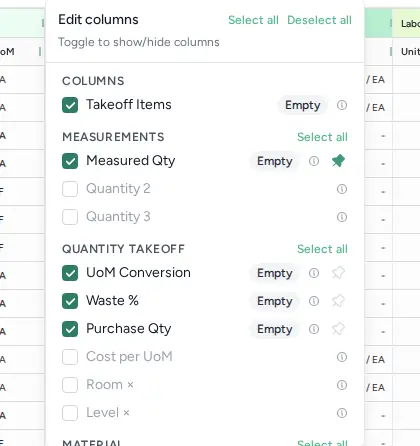
Quantity columns behind the price
- Measured Qty: what was measured in takeoff.
- Purchase Qty: measured quantity after waste and unit conversion.
- Cost per UoM: cost per unit of measure.
Extended cost uses Purchase Qty, so check it first if a total looks off.
Totals for the whole estimate
The footer shows Subtotal and Estimate Total (subtotal plus fees). The Totals column group shows the per-line subtotal.
Change a price on one line
Type a new value in the Unit cost cell. If you overwrite an extended cost, hover it to see the original; right-click and choose Revert to original to undo the override.
Where a price comes from
A line's unit price comes from, in order:
- A price you typed on the line.
- The catalog item's price formula, if it has one. These cells show a small "ƒ" marker; hover it for details.
- The catalog item's base price.
Ways to check the source:
- Show the Origin column (via Edit columns).
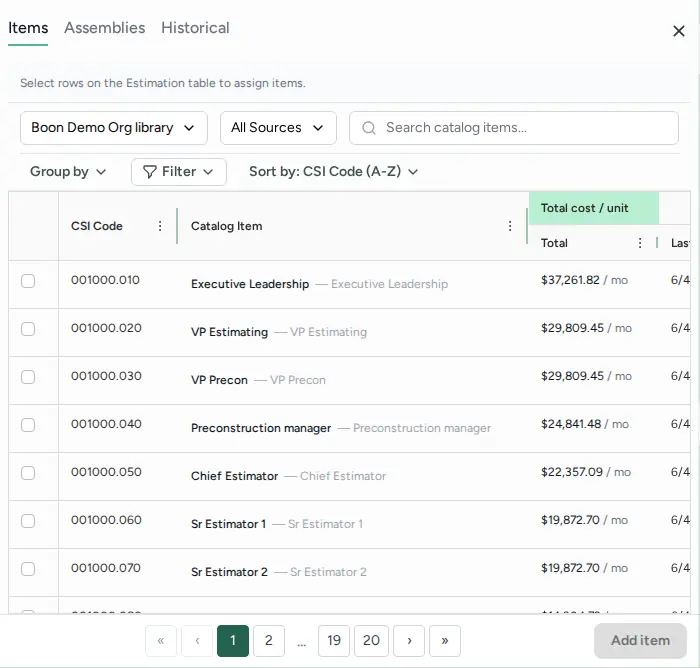
- Open the catalog with Items (tooltip "Show Catalog of line items") and use the All Sources filter to see which library or import an item came from (for example CSV Import, Manual Entry, or a Boon catalog).
- Open Historical (tooltip "Show list of conceptual items") to see unit costs from your past projects.
If your account has vendor pricing turned on, a Vendor column under Other shows the vendor; "Generic" means no vendor was set.